Loggers Tab⚓︎
The Loggers tab allows you to set up an object that logs information to a file. When a logger is called from a Task, it uses the file location, headers, timestamp, and schema field to generate the file.
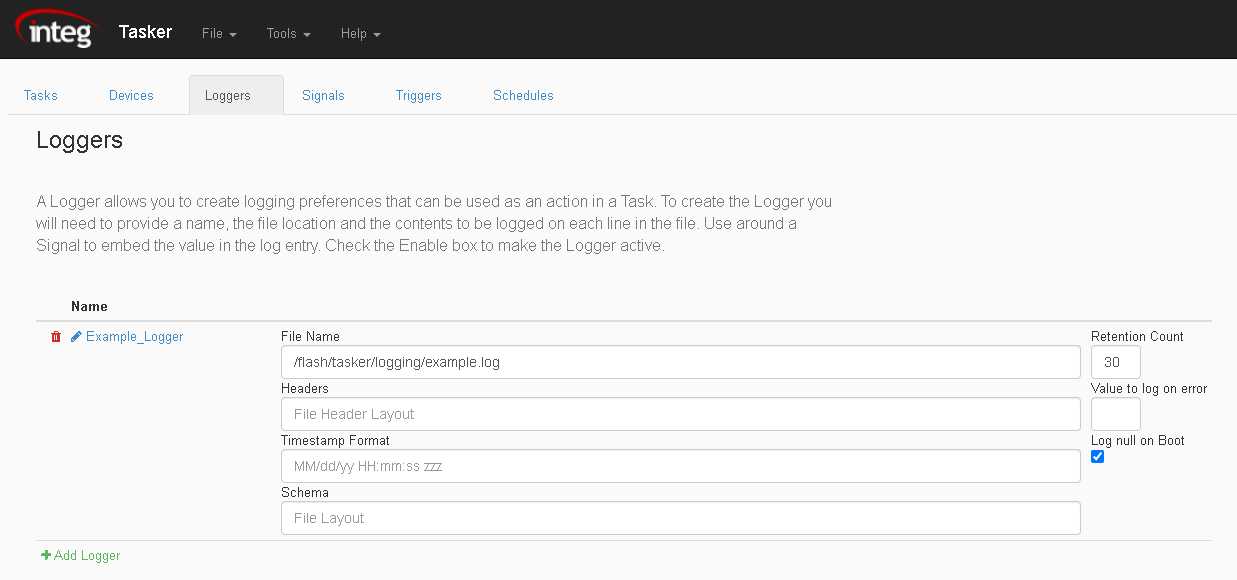
Below are the different options when using the Loggers Tab:
- Adding a Logger - The 'Add Logger' option to add a Logger. The added Logger when activated will log data determined by what information you tell it to record in its fields.

- Removing a Logger - Use the trash icon to delete a logger. This will remove the Logger from the list of loggers.

- Reordering a Logger - When two or more loggers are added in the Loggers Tab, arrows next to each logger will appear. These arrows shift loggers up and down within the list of loggers, allowing you to reorder them.

- Renaming a Logger - Use the pencil icon to rename a logger.

Logger Fields⚓︎
-
File Name - In the file name field for a logger, you set the location the file will be created, and what it will be named.
-
Header -In the header field for a Logger, you set a header that will placed at the top of the file.
-
Timestamp - In the timestamp field for a Logger, you set the format of the date/time that is displayed next to information recorded in the Logger.
-
Log Values - In the schema field for a Logger, you enter the values you wish to record when the log executes.