Knowledge Bases
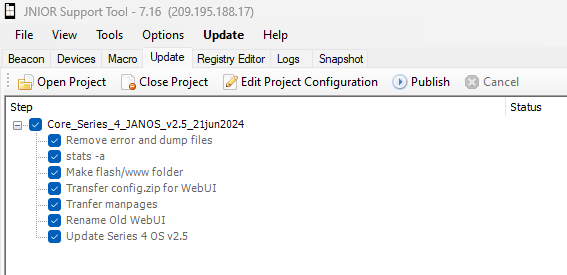
Updating the JNIOR's OS
Initializing search
Knowledge Bases
General
General
Getting Started
A Flexible Automation Controller
Overview
JANOS - Operating System
Pre-loaded Applications
Private Labeling
Frequently-Asked-Questions
Topics
Inputs/Outputs
Inputs/Outputs
Standard Isolated Digital Input
Inverting Inputs
Dry Contact Relays
Normally Open Versus Normally Closed Outputs
Set Output to Open or Close on Boot
JNIOR Connectors
Serial Ports
Serial Ports
JNIOR Serial Port
RS485 Wiring
Disabling the RS-232/COM Serial Ports Boot Dialog
Web Page Configuration
What is the JNIOR Webpage
Command Line Overview
RegEdit Utility
Configuring Email
Timezones and Daylight Savings
Public Web Pages
Expansion Modules
Expansion Modules
Temperature/Humidity Senser
Expansion Module Cabling
Octal 8 Input Digital Expansion Module
Bundled Applications
Web Page for Bundled Applications
Networking
Networking
Finding the JNIOR IP Address
JNIOR Protocols
Analyzing Network Traffic
JNIOR Internet Safe Operation
Disabling Required Login For Protocols
Series 3
Series 3
Series 3 JNIOR End Of Life
Series 3 Not Recommended for New Applications
Accessing Applets On Series 3 JNIORs
Java Applets vs. JNIOR Web Page
310/312/314 Battery Replacement
Factory Reset Series 3 JNIOR
Troubleshooting
Troubleshooting
Taking a Snapshot
Remotely Updating JANOS
Booting a JNIOR in Safemode
JNIOR IP Defaults to 0.0.0.0
Modbus Client Not Connecting
Flash File System Was Not Mounted
Resetting a JNIOR to Factory Settings
PHP Error
The Page Cannot Be Found
Troubleshooting a JNIOR Serially
JNIOR Series 3 Update Fails
Bundled Applications
Bundled Web Pages
MODBUS Server
Serial Control
Serial to Ethernet
Slaving
SNMP
Add-On Applications
Add-On Applications
Analog Presets
Cinema
Cinema
Getting Started
Cinema Application
When to Use Cinema
Installing Cinema
Web Page for Cinema
Enabling MODBUS Server (GDC Server)
Manually Upgrading Cinema from a Series 3 to Series 4
Cinema Migration Tool
Topics
Macros
Macros
Creating Macros in the Support Tool Macro Tab
Sending Commands to the Cinema Application to Execute Macros
Sending HTTP Requests in Cinema
Using Escape Sequences in Macro Actions
Adding Quotes to a Macro Command
Devices
Devices
Configuring the CinemaServerClient and PreshowClient
Sending Commands from a JNIOR to a Device with Cinema
Sending a Command to a Device that Requires a Login
Controlling Expansion Modules Using Macros
Executing DMX Scripts with Cinema
UDP Broadcast in Cinema
Macro Triggers
Macro Triggers
Execute Macros using Logic Rules
Scheduling Macros
Triggering Macros Using Input or Outputs
Triggering Macros from the Control Panel
Device Examples
Troubleshooting
Troubleshooting
Cinema Not Starting on Series 3
GDC to JNIOR Connection Not Working
DMX
DMX
DMX Application
Installing DMX
Creating a DMX Fixture
Creating a DMX Script
Creating a DMX Trigger
Using the DMX Panel
Articles
Articles
Remotely Execute DMX Scripts and Actions
Using any Jnior to Control DMX Fixtures
JNIOR 410 and a 412DMX Alternative
JNIOR as a DMX Fixture
JNIOR as a DMX Fixture Revisited
JNIOR Built-in UPS
Troubleshooting
Troubleshooting
Error Executing DMX Script from Client Connection When Using Version 3.4
MQTT
MQTT
MQTT Application
Installing MQTT
Articles
Articles
Home Assistant to monitor JNIOR Output
Home Assistant to monitor JNIOR Temperature
Tasker
Tasker
Getting Started
Introduction
Grapher Application
Installing Tasker
Message Building Rules
Tasker UI
Menus
Menus
File Menu
Tools Menu
Help Menu
Home View
Workspace View
Workspace View
Workspace Pane
Tasks Tab
Devices Tab
Loggers Tab
Signals Tab
Triggers Tab
Schedules Tab
Status Bar
Task Actions
Task Actions
Overview
Relay Output Actions
Digital Input Actions
Analog Output Actions
Control Panel Actions
Control Structure Actions
File Actions
Other Actions
Timing Actions
Lighting Actions
Communication Actions
Examples
Examples
Value Syntax
Action Examples
Logging Examples
Logical Expressions
Sending Commands to Tasker
Troubleshooting
Utility
Embedded Programming
Introduction
JANOS Runtime Installation
Creating a Project
Creating a Project (VSCode)
Running an Application
Other Application Considerations
Hello World
Contract with INTEG
Javadoc
GitHub
GitHub
JBakup
Log Temperature
Serial Input State Reporter
Power Event Log
Examples
Examples
Barcode Scanner
Checking for a Trusted Secure Connection
Easy Default Configuration
Emailing using JANOS.sendmail()
Emailing using Mail Composer
Encryption / Decryption
Ensure one instance of a process is running at a time
Implementing Authentication
IO Log Monitor
Is Network Active
JBakup
Latching Relays from Momentary Inputs
Log Temperature
MODBUS Registers
Multiplexing Sample Application
Outgoing HTTP Request
Outgoing Secure Socket Connection
Perform a reboot from Java Application
Pulse Outputs
Power Event Log
Sending Messages in the Message Pump
Sending MQTT Messages Using The Message Pump
Serial Input Buffer Size
Serial Input State Reporter
Set Initial Output States on Boot
Setting the Volume on the Control Panel
System Message Pump
Web Page for System Message Pump
Write Outputs
Topics
Digitial Inputs
Relay Outputs
Expansion Modules
Ethernet Communication
Serial Communication
Security
Message Pump
Logging
File System
Registry
Watchdog
Email
Threading
Immutable
System
Interface with the JNIOR
Jnior Websocket
Jnior Websocket
Introduction
Connection
Logging In
Registry
Control I/O
Application Messaging
Examples on Github
Examples
Examples
Javascript Connection example
JmpLib
JmpLib
Introduction
Download
Release Notes
Github
Status Codes
Create Connection
Query for JNIORs
Connection
Authentication
Internal I/O
Monitor Packet
Inputs
Outputs
External I/O
Four - Twenty Milliamp Module
Power 4 RelayOutput Module
Control Panel
Environmental Sensor
Octal Input Module
Temperature Probe
Ten Volt Module
Three Channel Dimmer
System
Registry
File System
Console Session
PC Applications
PC Applications
JNIOR Support Tool
JNIOR Support Tool
Getting Started
JNIOR Support Tool
Features
Beacon Tab
Beacon Tab
What is Beacon
JNIOR Options in Beacon
Device Tab
Macro Tab
Update Tab
Update Tab
How to Use the Update Tab
Updating the JNIOR's OS
Update Project Steps
Registry Tab
Snapshot Tab
Snapshot Tab
Taking a Snapshot
Taking a Backup
Tools
Tools
PuTTY Command Line from the Support Tool
Test JNIOR Protocol Commands with Hex String Sender
Test Macros with Macro Name Sender
JAVA Supporter
JAVA Supporter
Introduction
Beacon Tab
Device Tab
Macro Tab
Update Tab
Registry Tab
Snapshot Tab
Tools
Tools
Command Line
Create Jnior Protocol Commands
Test Macros
Updating the JNIOR's OS
t