Control Structure Actions⚓︎
If Block⚓︎
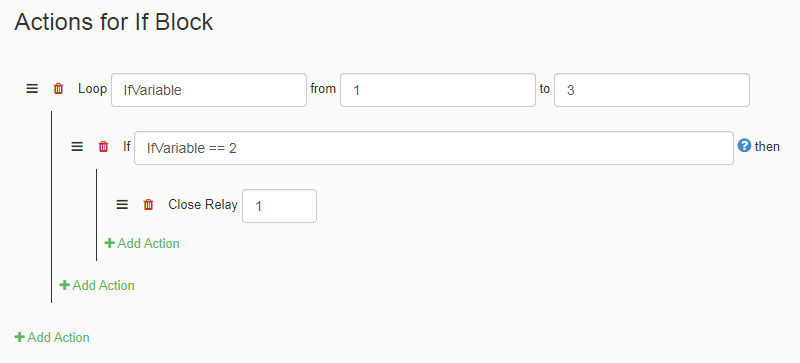
An If-Block Action creates a condition using a variable, that activates other actions when the condition is meet. In the example above, the variable from the loop changes from 1 to 3. The If Block uses that variable to make it so when it becomes 2, it will close output 1.
| Element | Type | Notes |
|---|---|---|
| Expression | Boolean | Whatever value is entered must be able to evaluate as either true or false. |
If:Else BLock⚓︎
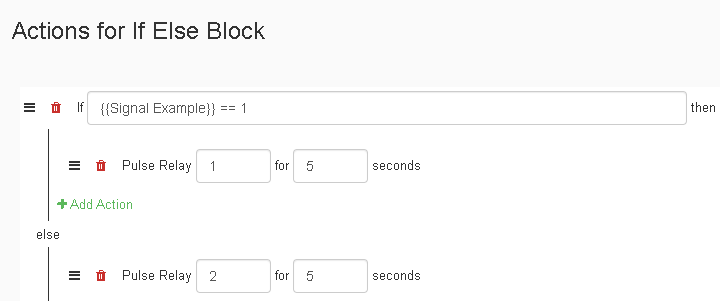
An If-Else-Block Action creates a condition using a variable, that activates one set of actions when the condition is meet, and a different set of actions when the condition is not meet. In the example above, the If-Else-Block uses a signal from the signals tab to determine the condition for the If-Else-Block, by checking if the signal is high.

The signal called "Signal Example" monitors the state of output 4 as shown in the picture above. The If-Else-Block uses the condition to make output 1 pulse if output 4 is high, or make output 2 pulse if output 4 is low.
| Element | Type | Notes |
|---|---|---|
| Expression 1 | Boolean | Whatever value is entered must be able to evaluate as either true or false. |
| Expression 2 | Boolean | This expression resolves if the first one returned false. |
For Loop⚓︎
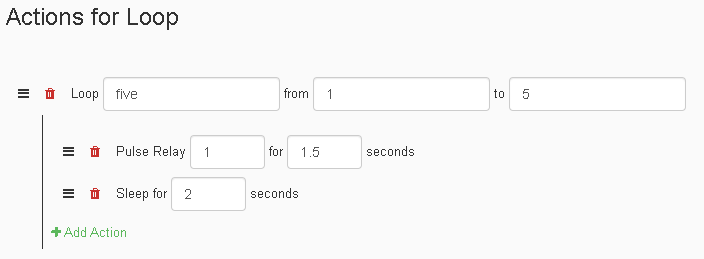
The Loop Action makes actions within it reiterate a number of times equal to the length of the loop from its start value to end value. This action can be useful when you want actions to repeat. The example above pulses the output 1 for 1.5 seconds 5 times.
Creating a Loop with a variable⚓︎
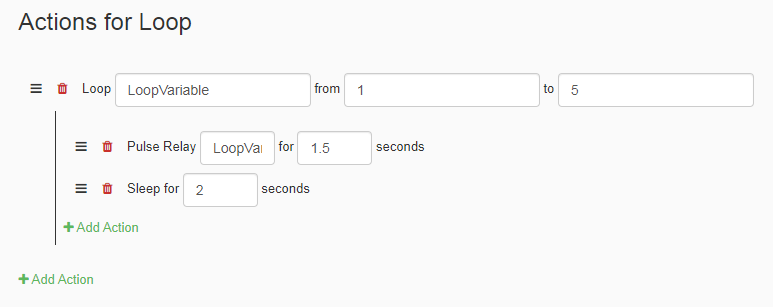
When using a Loop, the first value when creating a loop can be used to define a variable name. This can be used to make a loop address different things each time the loop iterates. An example of this is in the picture above, which declares a variable in the loop and sets the Relay that will pulse as it goes through the loop. This will make outputs 1 - 5 pulse for 1.5 seconds, one at a time.
| Element | Type | Notes |
|---|---|---|
| Expression | Number | Whatever value is entered must be able to evaluate as either true or false. |
| Loop Start | Number | This is the value that the loop will start at. |
| Loop End | Number | This is the value that the loop will end at. |
While Loop⚓︎
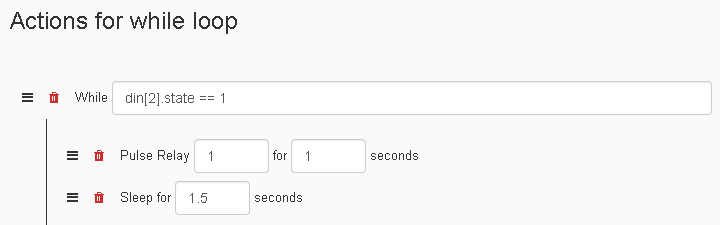
The While-Loop Action makes actions within it reiterate until the conditonal in the value field is met. In the example above, the While-Loop is made to pulse output 1 until input 2 is no longer High.
| Element | Type | Notes |
|---|---|---|
| Expression | Boolean | Whatever value is entered must be able to evaluate as either true or false. |