SNMP⚓︎
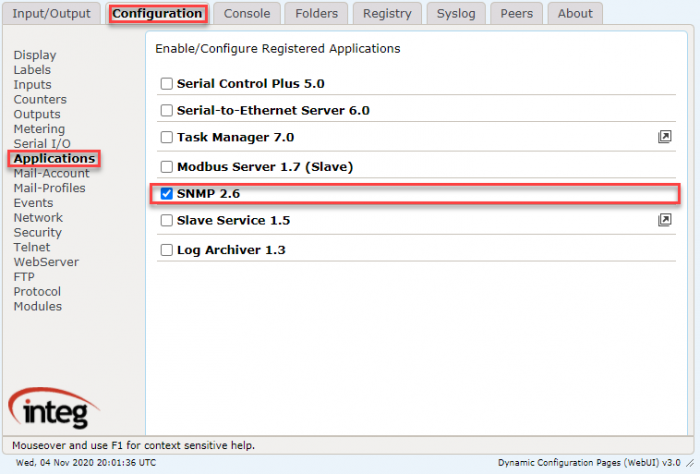
SNMP is one of the applications from the Bundled updated project that comes pre-installed on your JNIOR. You only need to enable the SNMP application to start on boot. In the JNIOR WebUI, clicking the checkbox next to SNMP in the application section of the configuration tab will allow it to run on boot. You’ll need to restart the JNIOR for this to take effect.
Using an SNMP browser allows you to look into information provided from the JNIOR-MIB file. The JNIOR-MIB file provides the user with the ability to query the JNIOR for various system information and I/O status such as:
| Object | Description |
|---|---|
| SysDescr | returns the JNIOR serial number, OS version and sub-OS version |
| sysObjectID | returns the Object ID for the JNIOR (INTEG) |
| sysUpTime | returns the amount of time the JNIOR has been running since the last reboot |
| sysContact | returns contact information for INTEG |
| sysName | returns the Hostname for the JNIOR (configurable from the JNIOR Support Tool) |
The JNIOR-MIB file can be used to generate custom trap messages along with several standard trap messages:
- JNIOR is rebooting
- JNIOR has rebooted successfully
- An application has started on the JNIOR (such as Cinema.JNIOR)
- A log file has been backed up because the primary log file is full
- A log file has been compressed (when compression is enabled)