Scheduling Macros⚓︎
You can use the scheduling in Cinema.jar to schedule macros daily, weekly or monthly.
When Cinema.jar is installed and executed for the first time it will create 3 default keys. They will look like this in the registry.
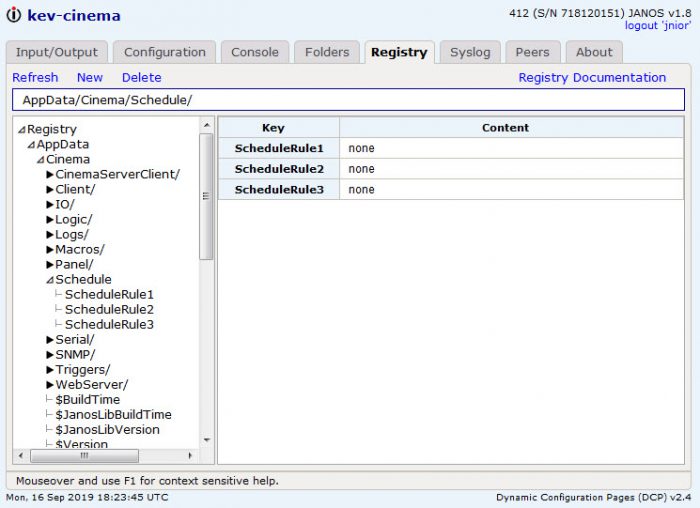
The configuration is a multi-part registry key. There are three parts. The type, the time of day, and the macro to execute.
Here are examples of the different scheduling types:
Daily⚓︎
You can define a macro to execute at a specific time every day. To do this we use the daily type. An example of executing a macro daily at 3:30pm with the name test would be:
daily, 15:30, test
Weekly⚓︎
You can define a macro to execute on certain days of the week. To do this we use the 2 character day abbreviations in place of the type field. The 2 character day abbreviations are [Su], [Mo], [Tu], [We], [Th], [Fr] and [Sa]. An example of executing a macro every day of the week at 3:30pm with the name test would be:
sumotuwethfrsa, 15:30, test
Monthly⚓︎
Macros can be defined to execute on a certain date of the month, every month. To do this we use the monthly type followed the day of the month inside the parenthesis. An example of executing a macro with the name test would be:
monthly(15), 15:30, test
You can also select to only execute the macro on certain months. Do do this we use 3 character month abbreviations. [Jan], [Feb], [Mar], [Apr], [May], [Jun], [Jul], [Aug], [Sep], [Oct], [Nov] and [Dec]. Only one month can be selected at a time.
sep(15), 15:30, test
Reboot Example⚓︎
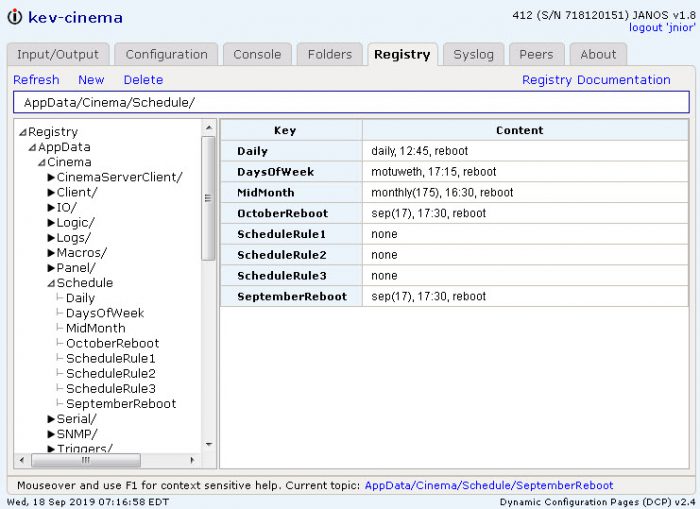
Here is a registry example. Below each schedule rule uses the command ‘reboot’. ‘reboot’ and ‘reboot -a’ are two commands that have been implemented in the scheduling logic that don’t need a macro to perform an action. As their names suggest, ‘reboot’ will perform a reboot and ‘reboot -a’ will perform a reboot -a.