Lighting Actions⚓︎
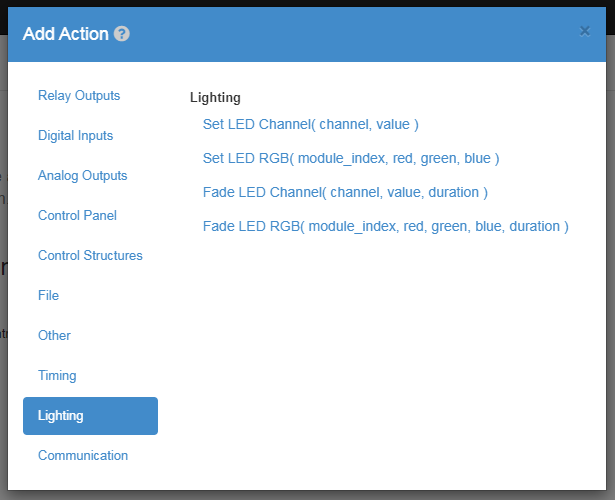
Set LED Channel⚓︎
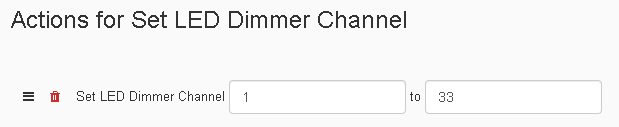
The Set-LED-Dimmer-Channel Action allows you to set one of three channels on the 3 Channel Dimmer expansion module to a percent of 0 - 100% over a time period in seconds. Setting channel 1 will change the red display on the dimmer, setting channel 2 will change the green display on the dimmer, and setting channel 3 will change the blue display on the dimmer. If you have two 3 Channel LED Dimmer's then setting the channel to 4 would change the red display of the second dimmer, setting the channel 5 would change the green display of the second dimmer, and setting the channel to 6 would change the blue display of the second dimmer.
| Element | Type | Notes |
|---|---|---|
| Channel | Number | The number has to be one of the available outputs on the 3 Channel Dimmer. |
| Percent | Number | The amperage supplied to the output. |
Set LED RGB⚓︎

The Fade-LED-Dimmer-RGB Action allows you to fade all 3 channels of the 3 Channel LED Dimmer at once. The first value in the action is incase there is two Dimmers currently plugged into the JNIOR. To change the first Dimmer you set the channel to 1, or 2 for the second Dimmer. After the first value, the next 3 values are used to set the Red, Green, and Blue channels of the Dimmer using percentage of 0 - 100%.
| Element | Type | Notes |
|---|---|---|
| Dimmer | Number | Specifies which dimmer is being controlled. |
| Channel 1 Amperage | Number | The ameperage supplied to output 1. |
| Channel 2 Amperage | Number | The ameperage supplied to output 2. |
| Channel 3 Amperage | Number | The ameperage supplied to output 3. |
Fade LED Channel⚓︎

The Fade-LED-Dimmer-Channel Action allows you to fade one of three channels on the 3 Channel Dimmer expansion module to a percent of 0 - 100% over a time period in seconds. Setting channel 1 will change the red display on the dimmer, setting channel 2 will change the green display on the dimmer, and setting channel 3 will change the blue display on the dimmer. If you have two 3 Channel LED Dimmer's then setting the channel to 4 would change the red display of the second dimmer, setting the channel 5 would change the green display of the second dimmer, and setting the channel to 6 would change the blue display of the second dimmer. Lastly you can set the duration it takes for the these values to fade.
| Element | Type | Notes |
|---|---|---|
| Channel | Number | The number has to be one of the available outputs on the 3 Channel Dimmer. |
| Percent | Number | The amperage supplied to the output. |
| Time | Number | The amount of time it will take to gradually change the amperage of the output to it's new value. |
Fade LED RGB⚓︎

The Fade-LED-Dimmer-RGB Action allows you to fade all 3 channels of the 3 Channel LED Dimmer at once. The first value in the action is incase there is two Dimmers currently plugged into the JNIOR. To change the first Dimmer you set the channel to 1, or 2 for the second Dimmer. After the first value, the next 3 values are used to set the Red, Green, and Blue channels of the Dimmer using percentage of 0 - 100%. Lastly, the amount of time for the channels to transition to those percentages is set in the last value field of the action.
| Element | Type | Notes |
|---|---|---|
| Dimmer | Number | Specifies which dimmer is being controlled. |
| Channel 1 Amperage | Number | The ameperage supplied to output 1. |
| Channel 2 Amperage | Number | The ameperage supplied to output 2. |
| Channel 3 Amperage | Number | The ameperage supplied to output 3. |
| Time | Number | The amount of time it will take to gradually change the amperage of the outputs to their new value. |