Set Inputs To Trigger/Release Fire Alarm⚓︎
Theaters require fire alarms to make sure people are warned if a fire is occurring. Cinema has functionality implemented so it will activate or release a fire alarm cue when specified inputs are triggered. Here is how to set those inputs.
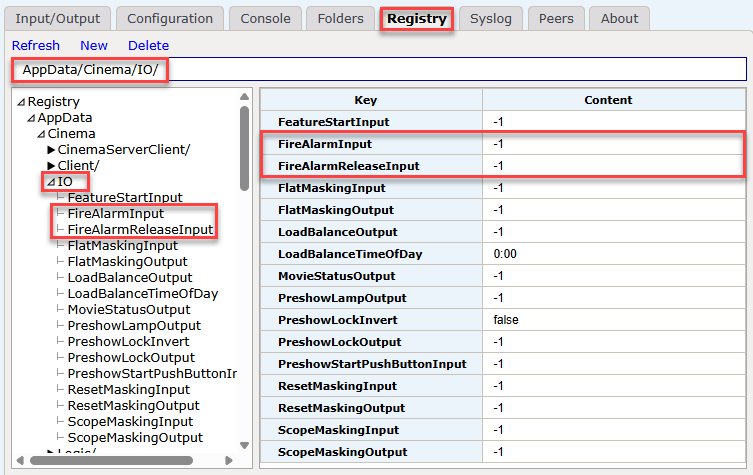
When accessing the JNIOR Webpage, there are registry keys that can be defined to assign pre-defined macros to I/O values. These registry keys are under the AppData/Cinema/IO registry folder. The registry key 'FireAlarmInput' is located here, and whatever number is set here is the associated input number that gets assigned as the Fire Alarm Input. By default, its set to -1 so that no input is assigned to it.
Similarly, there is a 'FireAlarmReleaseInput' key, and this is used to stop the fire alarm from triggering. This is needed because once the fire alarm input triggers, it will continue to run it's associated macro on an interval until the fire alarm release input you assign is triggered. Just like the Fire Alarm Input, whatever number is set for the 'FireAlarmReleaseInput' key is the associated input number that gets assigned as the Fire Alarm Release Input. By default, its set to -1 so that no input is assigned to it.
Once the inputs you want to use are entered, a macro called 'Fire Alarm' by default is assigned to your Fire Alarm Input, and it will run when the input is activated. This is set under the AppData/Cinema/Macros registry folder. The registry key 'FireAlarmMacro' by default should contain the name 'Fire Alarm'. Changing this value would change the macro that runs from the Fire Alarm Input to whatever macro name you enter. The 'Fire Alarm' macro that is used by default has no pre-defined actions. It requires you to create the macro in a macro file named 'Fire Alarm' and publish it to your JNIOR for it to do anything.
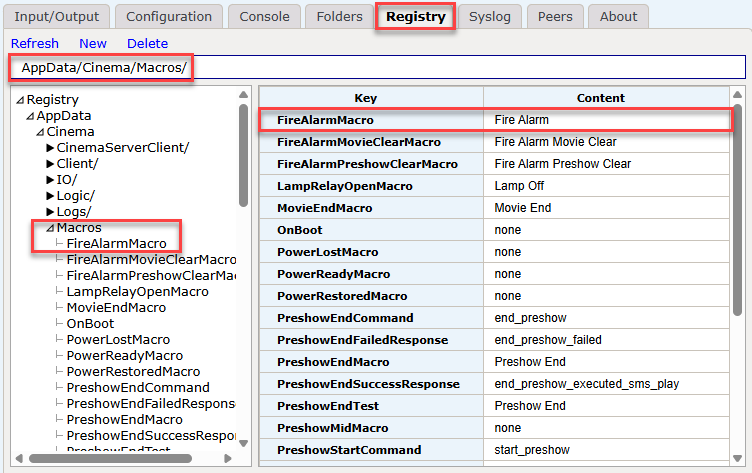
Once you've assigned inputs to the FireAlarmInput and FireAlarmReleaseInput registry keys, and created a 'Fire Alarm' macro that you've published to the JNIOR, your JNIOR should be setup to run a 'Fire Alarm' that starts and stops when those inputs are triggered.
NOTE:
When wiring a fire alarm to a JNIOR's input, you may want to setup the wiring so that the input triggers the fire alarm when it LOSES power. This is so in the event of a fire, if the wire connected to the JNIOR input gets destroyed, it doesn't prevent the fire alarm from occurring. Inverting the JNIOR's input so it triggers on LOSING power can help achieve this setup.