Installing DMX⚓︎
The DMX application does not ship preinstalled. You MUST obtain the application from our website. There is a download on the website that will be opened in the JNIOR Support Tool and published to the JNIOR. This is called an Update Project.
Here are links to latest versions of the JNIOR Support Tool and the Cinema application. NOTE: The DMX link below is for new installations only. If you already have the DMX application on your JNIOR and only need to update to a newer version, visit our DMX page to download our other update project for DMX that isn’t for new installs.
After installing both the JNIOR Support Tool and the DMX Update Project, you’ll want to open the Support Tool and click on the Update Tab. Once there, the first thing you’ll want to do is select the Open Project button, and select the DMX Update Project you just downloaded. When you open the DMX Update Project in the Support Tool you will see the following.
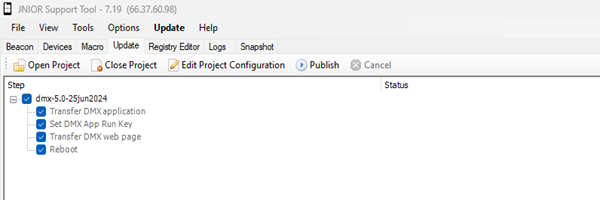
Once the update project is opened in the Support Tool, you can select the publish button. You'll be presented with a list of the JNIOR's recently reported in the support tool, with checkboxes next to them. Select the checkboxes of the JNIORs you want to publish to, and confirm. Once finished, your JNIOR(s) should have DMX installed and running!