NTP Clock Sync⚓︎
Network Time Protocol (NTP) is an internet protocol used to synchronize the clocks of computers and network devices to a precise time standard. The JNIOR utilizes this to keep its own clock sychronized. Time synchronization occurs during boot. Synchronization is attempted every four hours by default to maintain clock alignment. JNIOR may also be commanded to synchronize using the DATE -N command in the Command Console.
To utilize this capability, the JNIOR must be properly configured for a network with access to an NTP server. The NTPServer key defines the server using either a domain name or an IP address. An optional parameter may be used to define an alternate port. The format is as follows:
IpConfig/NTPServer = ServerAddress [, ServerPort]
An easy way to configure this key is from the configuration tab, under the network section:
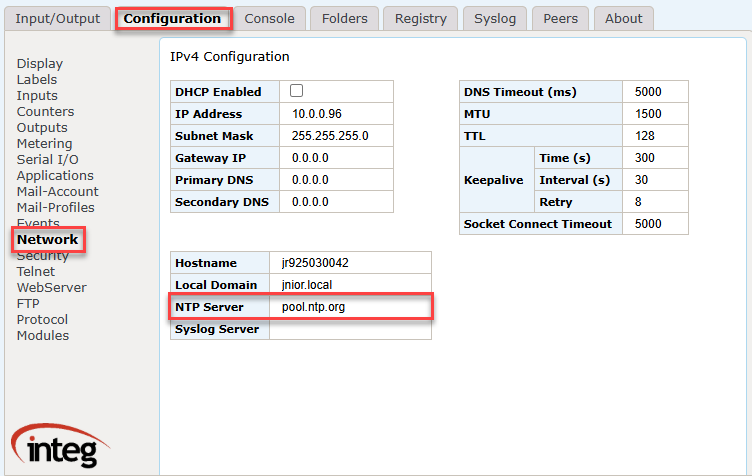
The default 'pool.ntp.org' domain supplies an NTP server from a large pool of servers. It is highly likely that a different server will be selected for each synchronization. If the supplied server does not respond the synchronization will be retried a few times. Beginning with JANOS v2.4 the retry will occur 5 or so minutes later giving time for the DNS entry to expire and thereby fetching a new NTP server that might be ready to assist you.
Another typical server address is 'time.nist.gov' and you may define a local NTP server. The standard NTP port number is 123.
Only one server can be specified. If that server is not available then the synchronization will be bypassed. Note that the clock is maintained by a battery during periods without power. Synchronization is not required but useful periodically as the clock will drift in accuracy over long periods. Typical computer hardware clocks (PCs for instance) typically drift by several seconds per day. NTP synchronization is critical in maintaining accurate time.