ARC/JAR/ZIP Command⚓︎
ARC/JAR/ZIP is a compression and file packaging utility. Files are stored in single library usually with the .ZIP or .JAR extension. This is used to compress files reducing storage space and to package multiple files in one library that can be managed as a single entity.
Here is an example of using the command to create a zip file using .txt files on the JNIOR.

Once your archive is created, you can then see what files exist in it using the -v option.
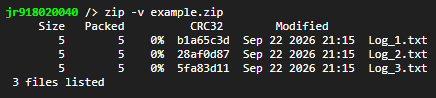
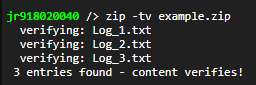
If you want to verify that the files inside the archive can be successfully retrieved, you can use the -t option.

Using the -t and -v options together show each file in the archive getting verified.
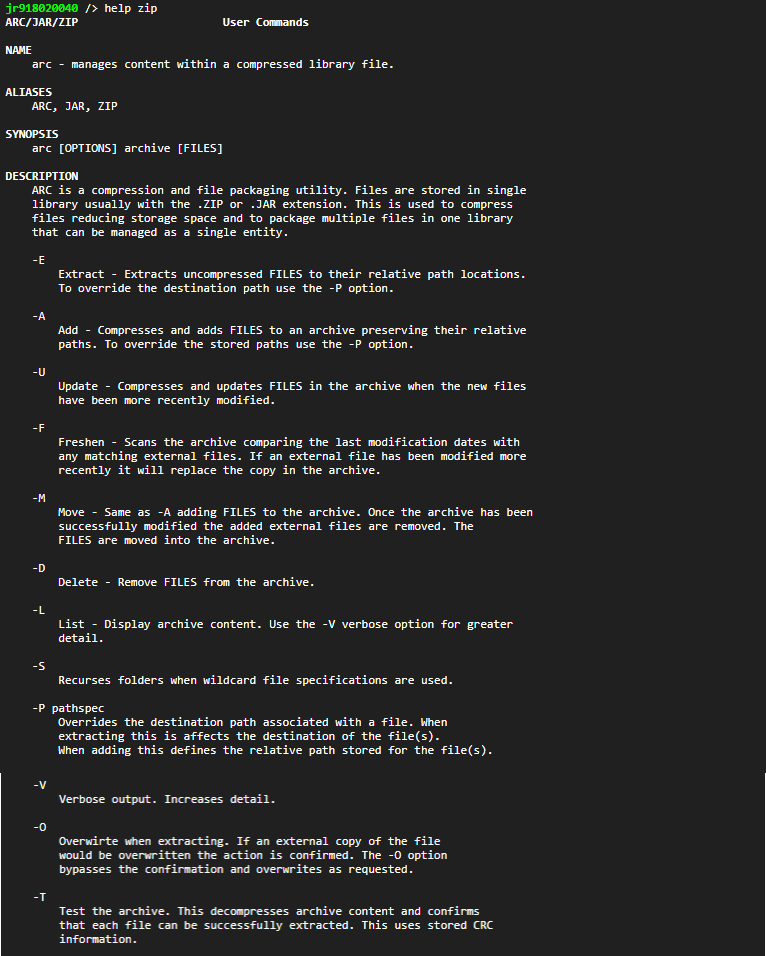
Typing help followed by any of the three commands will show all the different options you can use with these commands.
JAR and ZIP archives are equivalently formatted archive files. The JAR file is so named as it generally contains an application program for the JNIOR written in Java.
In some cases a ZIP/JAR library forms a virtual folder with the name of the library (without the extension) located at that point in the file system. That allows the JANOS Java Virtual Machine, Webserver and Help system to access files directly out of archives. Programs and websites each require multiple files in order to function properly and an archive file allows those to be transferred and managed easily as a group.
With JANOS 2.4 the CAT command can retrieve and display text content directly from a virtual folder formed by an archive file. This can give you easy access to the extended log files backed up by the optional JBakup utility.