Message Pump
On every JNIOR, there is a System Message Pump that is constantly circulating any message sent between applications. Each message sent around the system has a unique type that identifies the message. This is done so when an application receives a message, it can determine if the message was meant for it. If the message was for that application, it consumes the message and reacts accordingly for the what the application is doing. If its not meant for it, then it simply re-broadcasts the message so the next application can evaluate the message until the correct application receives it.
Message Types⚓︎
As far as the different types of messages that can be sent, there are two groups. The first group is the system messages, which are predefined and reserved only for the OS to use when its performing checks and tasks. Message numbers below 1024 (0x400) are reserved for the system. The most common example of this is the SM_PROBE (0x02) message. This is a message that isn’t supposed to be consumed by other applications and is supposed to make its way back to the OS after its sent. If the message doesn’t come back, then it knows somethings wrong, and an application is consuming messages it shouldn’t be. It fixes this by restarting the OS. Here are other predefined system examples the JNIOR OS uses. The other group of messages are user defined messages. These messages can have any message number at or above 1024 (0x400), and can be given any message a user would wish to define for the message.
| Code | Description |
|---|---|
| SM_SHUTDOWN (0x01) | This message is generated by the system prior to shutdown. The JNIOR is about to reboot. |
| SM_PROBE (0x02) | This message is generated by the system periodically. |
| SM_GCRUN (0x10) | This message indicates that the Garbage Collection (GC) has completed. |
| SM_WATCHDOG (0x11) | This message is generated by a application watchdog configured to send then message on timer expiration. |
| SM_SYSLOGMSG (0x12) | System log messages can be sent to an external Syslog Server. This message also passes the log information to listening applications. |
| SM_PWRLOST (0x20) | When Ride-Thru Power support is available this indicates the lost of external power. |
| SM_PWRGOOD (0x21) | When Ride-Thru Power support is available this indicates that external power has been restored. |
| SM_PWRREADY (0x22) | When Ride-Thru Power support is available this indicates that the supply is fully charged and ready to provide maximum holding capacity. |
| SM_REGUPDATE (0x40) | This message is generated whenever a registry entry is updated or removed. |
| SM_FILEUPDATED (0x50) | This message is generated whenever a file is updated. |
| SM_FILEREMOVED (0x51) | This message is generated whenever a file is deleted/renamed. |
| SM_FILEADDED (0x52) | This message is generated whenever a file is added. |
| SM_WEBSTARTUP (0x60) | Message sent when the Web Server process is activated. |
| SM_WEBSHUTDOWN (0x61) | Message sent when the Web Server process is terminated. |
| SM_PROTCMDMSG (0x70) | This message is generated when the JNIOR Protocol receives a custom command message. |
| SM_PROTCMDRESP (0x71) | This message is generated by an application in response to a SM_PROTCMDMSG command message. It is intended for the JNIOR Protocol server. |
| SM_PIPEOPEN (0x80) | This message is sent by the Web Server when a piped websocket connection has been established. The message contains the client IP Address and Port as well as the target message number. |
| SM_PIPECLOSE (0x81) | This message is sent by the Web Server when a piped websocket connection has terminated. The message contains the client IP Address and Port as well as the original targeted message number. |
| SM_USER (0x400) | Lowest allowed user defined message number. Applications that intend to exchange messages SHOULD attempt to define globally unique message identifiers. These must be values from 1024 and up. Message numbers below SM_USER are RESERVED by the system. |
Message Example⚓︎
Below is an example of two applications communicating with one another using a user defined message. They use the System class to declare a MessagePump and SystemMsg objects. The first application has a separate class that declares a listener interface that will be used to grab messages when they enter the message pump. Inside the first application, it opens the message pump and permanently loops, only pausing the loop when its listening for a message. When it receives a message with type 1600 it prints the string in the message and continues the loop again.
package messagepumpexample;

import com.integpg.system.SystemMsg;

public interface MessagePumpListener {

     public void messageReceived(SystemMsg systemMsg);

}
package messagepumpexample;

import com.integpg.system.MessagePump;
import com.integpg.system.SystemMsg;
import static java.lang.Thread.sleep;
import java.util.Vector;

public class MessagePumpExample {

    private static final MessagePump MESSAGE_PUMP = new MessagePump();
    private static final Vector LISTENERS = new Vector<>();

    public static void addListener(MessagePumpListener listener) {

        synchronized (LISTENERS) {
            LISTENERS.addElement(listener);
        }
    }

    public static void main(String[] args) throws InterruptedException {
        MESSAGE_PUMP.open();
        while (true) {
            System.out.println("looping");
            // read all messages from the message pump
            SystemMsg systemMsg = MESSAGE_PUMP.getMessage();
            // we must repost as fast as we can
            MESSAGE_PUMP.postMessage(systemMsg);
            String message = new String(systemMsg.msg);
            if (systemMsg.type == 1600) {

                System.out.println("Recieved command 1600.\n");
                System.out.println(String.format("The message was: %s\n", message));

            }
            sleep(10);
        }
    }

}
The second application opens the message pump, sends a user defined message containing a string and the message number 1600, and then closes the pump.
package messagepumpexamplesender;

import com.integpg.system.MessagePump;
import com.integpg.system.SystemMsg;
import static java.lang.Thread.sleep;

public class MessagePumpExampleSender {

    private static final MessagePump MESSAGE_PUMP = new MessagePump();

    public static void main(String[] args) throws InterruptedException {
        MESSAGE_PUMP.open();
        SystemMsg systemMsg = new SystemMsg();
        systemMsg.type = 1600;
        systemMsg.msg = "This message is from the MessagePumpExampleSender".getBytes();
        MESSAGE_PUMP.postMessage(systemMsg);
        sleep(5000);
        MESSAGE_PUMP.close();
    }

}
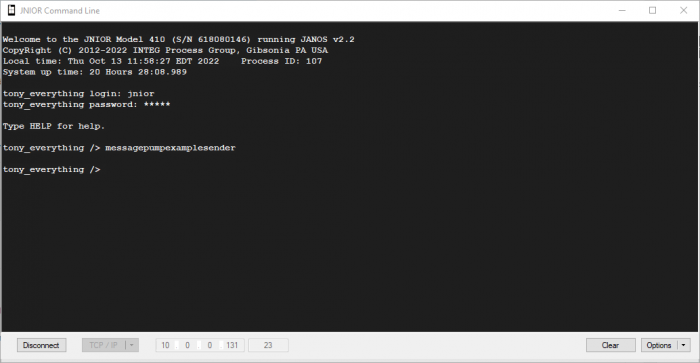
I put the built jar files of these example applications into the JNIOR’s flash folder and ran one from from the Web UI’s console tab and the other from a command line connection. As shown below, one application constantly loops through itself, pausing when its trying to get a message from the message pump and then printing the message out when it does. The other sends the message the first one is listening for.
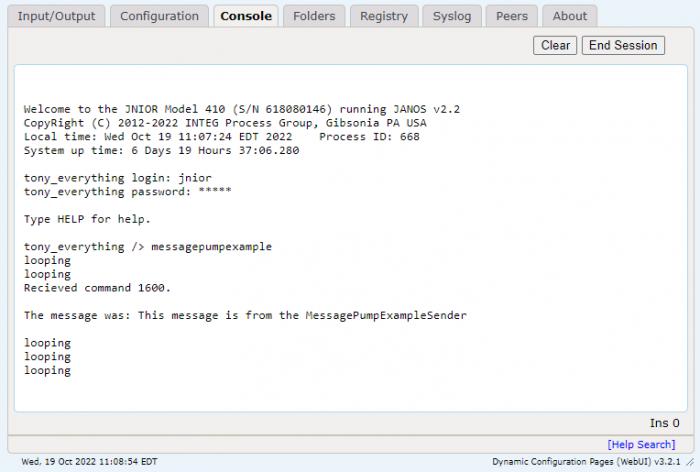
Note
In the picture above, the message only prints out once, while other times it just goes through the loop without printing the message. This is because we only handle one type of message, 1600. If it continues through the loop without printing a message, it means it got a message with a number type that wasn’t 1600. The other message its getting is most likely the SM_PROBE (0x02) message.