MODBUS Server
Introduction⚓︎
The JNIOR has a built-in MODBUS server for MODBUS TCP. The application is loaded by default but not enabled. You must use the DCP to enable the MODBUS server application.
INTEG is working on a MODBUS RTU implementation. This would require the JNIOR 410 to work on a RS-485 network. This application is not yet released but if you contact INTEG you can help us validate it.
The MODBUS server that is built-in implements MODBUS TCP. MODBUS is a request / response protocol and is not as efficient as other protocols. That being said, MODBUS is widely used.
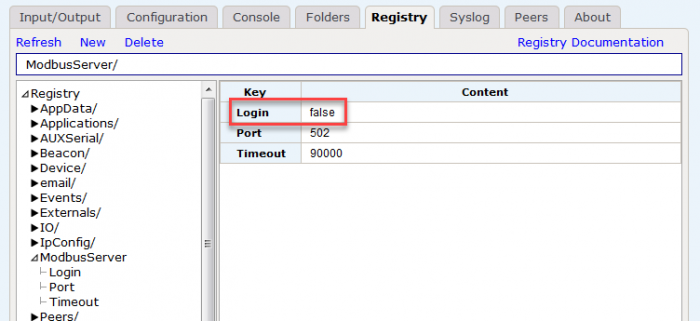
Since the JNIOR is security conscious, we have a login option built-in for applications where a custom function command can be implemented and sent. The Login is set to true by default. If a login cannot be sent, set the ModbusServer/Login registry key to false and reboot the JNIOR.
INTEG can write custom applications to communicate with other MODBUS devices across any of the MODBUS protocols. MODBUS RTU over RS-485 can only be used on the JNIOR 410. The JNIOR 410 is the only model with RS-485 capabilities.
The MODBUS Server application is part of the Bundled Update Project. Here is the documentation for the MODBUS server and MODBUS TCP protocol implemented by the JNIOR.
Configuration⚓︎
The MODBUS Server application is NOT enabled by default. It must be enabled before MODBUS masters or clients can send requests to the JNIOR. Once enabled the JNIOR will begin listening to TCP connections on port 502.
- To enable the MODBUS Server you should go to the DCP (Dynamic Configuration Page).
- Then navigate to the ‘Configuration’ tab.
- Lastly, select ‘Applications’ halfway down the left side. Make sure the MODBUS Server application is checked
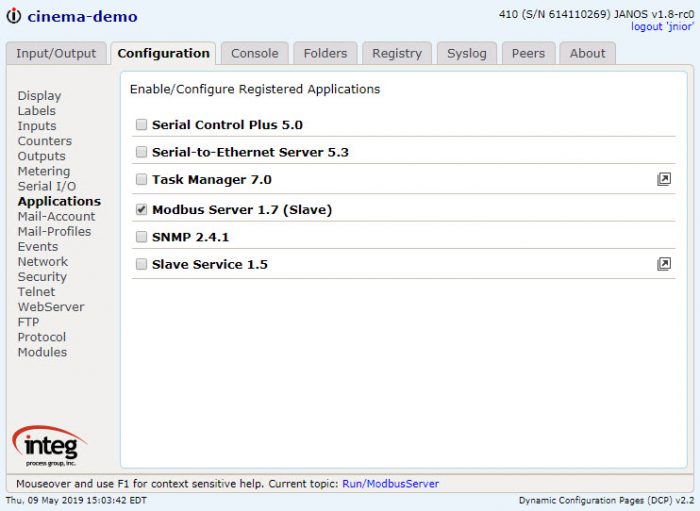
Once the application is checked it is then required you Reboot the JNIOR.
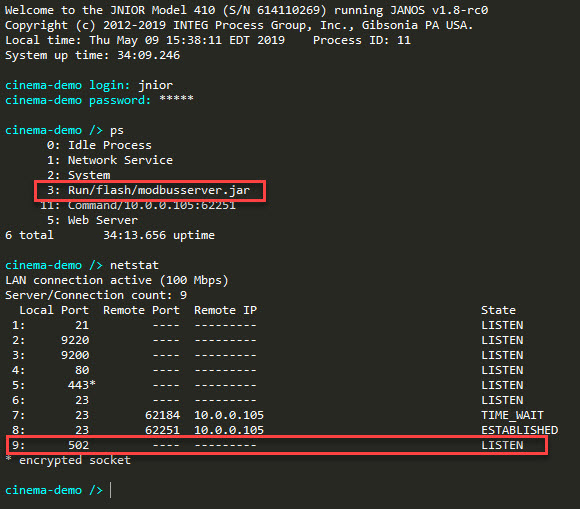
You can then optionally make a telnet connection to verify. The ps command to make sure the modbusserver application is running. Then you can use the netstat command to see that port 502 is listening.