Tasker 12.0 Release
| Name | Version | Release Date | Size | MD5 |
|---|---|---|---|---|
| Tasker | v12.0 | Jun 20 2023 | 2.9 MB |
[+] Added OSC (Open Sound Control) Device, Task Action, and Trigger for OSC Device control
[+] Added Serial Devices to the Device Tab
[+] Added Device Send Action as a general action for sending and receiving data from TCP, UDP and Serial Devices
[-] Depreciated the Serial Send Action. The Device Send action should be used instead, but will continue to work until the workspace is upgraded
[-] Depreciated the TCP Send Action. The Device Send action should be used instead
[-] Depreciated the TCP Receive Action. The Device Send action should be used instead
[+] Added (Device_name)_buffer in scripting. To be used in the Device Send action. Bytes returned from the Device with the specified name inside of the (Device_name)_buffer value are returned
[+] Added hexutils.bytestohex() in scripting. Formats bytes received from the (Device_name)_buffer value to Hex format
[+] Added string.frombytes() in scripting. Formats bytes received from the (Device_name)_buffer value to String format
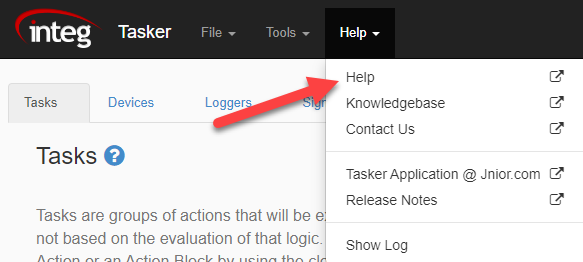
To get more information on anything in Tasker, you can visit the Tasker help manual from the Tasker Web Page. Select the help drop-down and click “Help”.
Tasker 11.0 Release
| Name | Version | Release Date | Size | MD5 |
|---|---|---|---|---|
| Tasker | v11.0 | Feb 09 2023 | 2.9 MB |
[*] fixed where schedules in multiple workspaces were not working
[+] adding toggle relay action
Tasker 10.0 Release
[+] creating a modbustag.update trigger
Tasker 9.0 Release
| Name | Version | Release Date | Size | MD5 |
|---|---|---|---|---|
| Tasker | v9.0 | Dec 20 2021 | 2.9 MB |
[+] now allowing you to compare the value of a string agains other primative types like numbers or booleans. \"false\" == false
[+] time zone offset from GMT now available in the date format. date(\"HH:mm Z\") will equate to \"16:30 -0500\" for Eastern DST
[+] checking the state of din and rout no loner need to be compared to 0 or 1. A simple din[#].state or !din[#].state is sufficient
[+] added date.now() to get the current millis
[+] added din.lasteventtime() to get the millis of the last input event
[+] added rout.lasteventtime() to get the millis of the last output event
[+] added iolog.lasteventtime() to get the millis of the latedt input or output event
[+] added task description to getTaskDevices
Tasker 8.1
| Name | Version | Release Date | Size | MD5 |
|---|---|---|---|---|
| Tasker | v8.1 | Jul 29 2021 | 2.9 MB |
[!] fixed addressing more than one LED modules
[+] added 10v Fade for percentage and voltage
[!] fixed an issue where new signals were not available until the page was reloaded
[~] new objects have a default name provided
[+] now indicating the Latitude and Longitude format
[!] fixed the user alert action
[!] fixed where object could be added twice quickly
[+] added a delay to the tool tips to prevent them from flashing
[+] email profile names can now be specified in a variable
Tasker 8.0
| Name | Version | Release Date | Size | MD5 |
|---|---|---|---|---|
| Tasker | v8.0 | Jul 12 2021 | 2.9 MB |
New Help System! Take a look and give us your feedback!
[+] created a Workspace page to manage multiple Workspaces
[+] created a Workspace Pane on the right of the Tasker Page when a Workspace is open
[+] added a Registry Write Action
[+] added a Serial Send Action
[+] added a prompt for user when leaving the Tasker web page when Changes are in progress.
[+] new help system
[+] added notes for Workspaces
[+] added the ability to clone Workspaces and tasks
[+] added the ability to initialize variables via json task.execute handler
[~] all disabled objects now contain red font and a gray background
Lots of small UI tweaks for a better user experience
Go to the Tasker Application page for more information
Tasker 7.0
| Name | Version | Release Date | Size | MD5 |
|---|---|---|---|---|
| Tasker | v7.0 | May 10 2021 | 2.2 MB |
- [!] corrected the Log Null On Boot checkbox. It was showing unchecked though it should be checked by default.
- [!] corrected an issue where a deleted workspace does not unload from tasker
- [+] can now easily enable / disable an entire workspace via the File menu
- [+] disabled workspaces will have a red banner and footer alerting the user that they are disabled
- [+] added the ability to trigger on any input or any output
- [+] added the ability to reorder the tasks in the Web App
- [+] added a warning message when navigating away from the Web App to alert the user of unsaved changes.
- [~] redesigned the "Add Action" dialog to be less busy
- [+] previously selected Task will be reselected on page reload
- [+] added Grapher to the Tasker install
Go to the Tasker Application page for more information
Tasker 6.1
- [!] Fixed an issue where a blank DateFormat field in a Log Profile would cause the timestamp to not get logged
- [+] added the ability to trigger on either high or low signals for digital inputs or relay outputs
- [+] added a variable to task scope for the object that caused a task to execute. the variable can be referenced as task.caller
- [+] adding get task devices web handler
- [!] fixed issue where devices weren't found when loading tasks because tasks were being loaded before devices
- [+] log what is being sent from an Ethernet device to tasker_devices.log
- [!] corrected issue with the log profile file retention method. We were not correctly identifying the files matching the fileformat.
- [!] corrected issue where getDoubleParam was expecting a variable to start with $. This is no longer a requirement.
- [+] implemented Clear Input Latch action
- [+] added the ability to trigger on ANY control panel switch
- [*] Updated the status message that it is sent any time a task is executed with the name of the calling object
Tasker 6.0
| Name | Version | Release Date | Size | MD5 |
|---|---|---|---|---|
| Tasker | v6.0 | Mar 18 2021 | 1.3 MB |
Warning: The Triggers tab functionality was reworked! Any Triggers that are currently defined will need to be reconfigured.
- [*] reworking triggers
- [*] adding single switch control panel trigger
- [*] adding multi-switch control panel trigger
- [*] adding delayed reset
- [+] added WebServerPort registry key Default -1 or meaning disabled
- [+] adding ExecuteTask web request handler /executetask name=TASK_NAME
- [+] adding GetLoadedTasks web request handler /getloadedtasks
- [+] automatic upgrading of old trigger configuration
Go to the Tasker Application page for more information. The Cinema Knowledge-base has helpful information on how to use the features in Cinema.jar.
Tasker 5.0
- [+] adding action to kill, cancel or abort a task
- [+] adding HTTP request action
- [+] adding MQTT publish action
Tasker 4.0
| Name | Version | Release Date | Size | MD5 |
|---|---|---|---|---|
| Tasker | v4.0 | Dec 18 2020 | 1.2 MB |
4.0, 10 dec 2020
- [+] variables that start with $$ are global variables. These are global WITHIN the workspace.
- [+] added Control Panel Switch implementation
- [+] added a tasks.get WebSocket handler
- [+] added a task.list WebSocket handler
- [+] added http post functionality
- [!] scheduling changes take effect immediately when a workspace is reloaded
- [+] validation on task names, device names, logger names, signal names, trigger names, and schedule names to prevent spaces and bad characters. Names can only be alphanumeric and can include underscores.
3.9, 18 nov 2020
- [!] fix error where parameters used to have to be named starting with $.
3.8, 07 oct 2020
- [!] fix error for only handling 8 output triggers.
- [!] fix error where a temp probe couldnt be assigned to a variable.
- [+] added http post functionality.
3.7, 02 oct 2020
- [+] Added tracking the parent workspace name so that all of the tasks can be removed from the collection that belong to a workspace that is updated or removed.
3.6
- [+] Added a tasks.get handler.
- [+] Added a tasks.list message.
3.5
- [+] Added a user.alert message.
3.4
- [+] removed the requirement for the schedule start day.
- [+] fixed the schedule reloading so that the new schedule takes effect and does not require a reboot.
Go to the Tasker Application page for more information. The Cinema Knowledge-base has helpful information on how to use the features in Cinema.jar.
Tasker 3.3
| Name | Version | Release Date | Size | MD5 |
|---|---|---|---|---|
| Tasker | v3.3 | Jul 30 2020 | 1.0 MB |
- [+] adding duplicate instance check
- [+] variables that start with :: shall be global
- [+] add TCP Recv
- [+] add TCP Close
- [+] new execute script action
- [+] uses new scripting engine
- [!] fixed issue where dst timezone was not being logged
- [+] adding action to prepend to file
- [+] adding retry logic to external identifier objects. included creating external identifier parent class
- [+] adding action to copy file
- [+] adding action to move file
- [+] add ascii tcp and serial servers for tasker control
- [~] now preventing spaces in workspace names. current workspace files with spaces will be renamed with an UNDERSCORE
Go to the Tasker Application page for more information. The Tasker Knowledge-base has helpful information on how to use the features in Tasker.
Tasker 3.2
| Name | Version | Release Date | Size | MD5 |
|---|---|---|---|---|
| Tasker | v3.2 | Jun 18 2020 | 958.1 KB |
- + added 4-20ma modules
- + added 10v modules
- + added email send attachment option
Go to the Tasker Application page for more information. The Tasker Knowledge-base has helpful information on how to use the features in Tasker.
Tasker 3.1
| Name | Version | Release Date | Size | MD5 |
|---|---|---|---|---|
| Tasker | v3.1 | May 05 2020 | 942.1 KB |
- Added If / Else Block Task Action
- Added While Loop Task Action
- Added SNMP Trap Task Action - Tutorial
- Help pages are in progress
- Upload and download workspaces
- Delete a workspace (Workspace is backed up)
Go to the Tasker Application page for more information. The Tasker Knowledge-base has helpful information on how to use the features in Tasker.
Tasker 3.0
It has been a while since Tasker was released. Tasker was a quick attempt at making a replacement for the Task Manager application that has been around for more than a decade, starting on the Series 3.
Ample time has now been taken to create a fully capable application that will be every bit as functional as Task Manager but offer the benefits of a rewrite, using configuration files and the latest web technology.
Some of the changes and new features are as follows:
- Faster– The tasks are executed much faster and the triggers and schedule are monitored in real-time instead of once every 5 – 10 seconds.
- Workspaces - Separate configuration logic into multiple workspaces. Then multiple workspaces can be loaded on the JNIOR at the same time.
- Tasks are now separate from triggers. In Task Manager a Task was created and a Trigger was configured to get the Task to execute. In Tasker 3.0 Tasks are a separate entity that can be executed several different way including manual execution from the configuration page and being requested via an ASCII TCP connection.
- Tasks can now send data via an Ethernet connection. To do this, a Device must be created so that the action can specify which device to send the data to. Multiple devices can be configured.
- New Actions – We implemented actions that were previously available in Task Manager but are introducing many new actions like external module control, TCP communication and control structures.
- Drag n Drop – Drag and Drop functionality makes it easier to design your Task logic.
- Signals are now created to assign a specific property of a I/O point or sensor a name. The name can then be used in Tasks, Triggers or Loggers.
- Loggers can be created to define the file name and schema or what data should be logged to that file. Each line in a Logger will be prepended with a timestamp followed by a comma. Loggers also allow you to define the number of files that should be kept with the given naming pattern. Name patterns can include date patterns. This will help you create a file per day for example.
- Schedule – The schedule has additional options.
- JSON Configuration files are used now instead of registry keys. Registry keys were limiting in size. The Series 3 could only store 255 characters in a registry key. It is much easier to upload configuration files to other JNIORs to replicate setups.
- User Interface – The User Interface is now a native HTML application that uses the latest web technology. The latest web technology uses native HTML controls and Web-sockets to communicate with the JNIOR from your browser. This will allow accessibility over remote connections as long as port 80 is available. This is now consistent with the communication method used by the DCP. Task Manager had always used Java Applets. The Java Applets have not been able to launch in browsers for several years as they became frowned upon as security vulnerabilities.
This was just a short list of changes and new features. The documentation for Tasker should explain these topics as well as many others. If there is anything you don't understand please reach out to us for help. Additionally, if you have any suggestions or need the JNIOR to do something specific for you, please let us know.
For more information go to the Tasker Page