Cinema.jar 7.1
| Name | Version | Release Date | Size | MD5 |
|---|---|---|---|---|
| Cinema.jar - Update Project | v7.1 | Sep 23 2024 | 532.1 KB | d9c890122a3052e25cdac3552bd9e2e0 |
| Cinema.JAR Release Notes | v7.1 | Sep 23 2024 | 621.5 KB | bcdaec5eef1f1f852b7cba13a927a9f6 |
* implemented HTTP PUT action
* fixed the send method in external devices. it was not processing backslash-escaped characters. need to be fixed in all external devices
Cinema.jar 7.0
| Name | Version | Release Date | Size | MD5 |
|---|---|---|---|---|
| Cinema.jar - Update Project | v7.0 | Mar 21 2025 | 556.2 KB | fcdbd3cb683672bec4e36a45b6e0cdef |
| Cinema.JAR Release Notes | v7.1 | Sep 23 2024 | 621.5 KB | bcdaec5eef1f1f852b7cba13a927a9f6 |
* cleaned up error handling between the cinema server client and preshow client
+ added mute toggle for QSC DCP300
! fixed an issue where command raw ethernet devices were not closing connections after being used
* use threadpool when processing runMacros()
+ added the ability to queue macros for execution. this is helpful when responding to button presses
! fixed the issue with the Barco series 4 always reporting failed
+ added ability to query Cinema for status information via the message pump
Cinema.jar 6.9
- [!] Added holdtime to logic to ensure that signals remain in the desired state before executing their configured action.
- [!] Reimplemented watchdog enabled key.
- [!] Fix for combining output actions. A fix in an unreleased 6.7 version did not account for more than 2 outputs.
- [!] Debugged thread worker issues.
- [+] Added BarcoSeries4 as a send command: allows device commands to be sent using a raw ethernet device and the send command with the 'command:' prefix.
Go to the Cinema.jar Application page for more information. The Cinema Knowledge-base has helpful information on how to use the features in Cinema.jar.
Cinema.jar 6.4
- [!] External outputs as triggers beyond output 16
- [!] Attempted fix for QSC DCP300. Was sending ZEROS after each command and confusing the QSC when multiple commands were sent.
- [!] Issue with logging to the errors log
- [!] Fixed close pulse issue. this was an issue reading the macro file.
- [+] Added flush() to raw ethernet
Go to the Cinema.jar Application page for more information. The Cinema Knowledge-base has helpful information on how to use the features in Cinema.jar.
Cinema.jar 6.0
- [!] Handle ROUT 17 - 24 as internal macro action
- [!] Only start the iolog monitors if we have listeners configured
- [+] Add Doremi as a device
- [+] Allow device commands to be sent using a raw ethernet device and the send command with the 'command:' prefix
Go to the Cinema.jar Application page for more information. The Cinema Knowledge-base has helpful information on how to use the features in Cinema.jar.
Cinema.jar 5.0
- [!] Ignoring white-space around schedule keys.
- [!] Schedule keys no longer require a reboot when changed or added. removed schedules will require a reboot
- [!] Fixing an issue with embedding quotes in macro action data field
- [!] Allow comma delimited list of macros for input triggers
- [!] A macro in a macro list can be delayed since the start of executing the list or the execution of the last macro
- [!] Updating the http request to handle https responses better
- [+] Added a UDP Client listener
- [+] Added a device test event handler
- [+] Added Web Pages for Cinema to make testing macros and editing registry keys easier. Access by going to http://JNIOR_IP/cinema
Go to the Cinema.jar Application page for more information. The Cinema Knowledge-base has helpful information on how to use the features in Cinema.jar.
Cinema.jar 4.5
4.0, 4 oct 2019
- [+] added code to detect barco series 4 device and launch the barco pulse rpc application.
4.1, 03 dec 2019
- [!] trim unwanted spaces.
4.2, 04 mar 2020
- [!] fixed cp+8=1000 signed issue.
4.3, 29 apr 2020
- [!] changing the logging to use .bak files. the addition of the logarchiver application will compress the .bak files into zip archives.
- [!] forcing cinema_ prefix on all log files"),
4.4, 17 nov 2020
- [!] Modified the macro web handler to get the list of loaded macros"),
4.5, 10 dec 2020
- [!] Fixed issue working with outputs > 20.
- [+] rolled the barco pulse api into cinema.jar.
Go to the Cinema.jar Application page for more information. The Cinema Knowledge-base has helpful information on how to use the features in Cinema.jar.
Cinema.jar 3.6
+ Adding web handlers for getDevice without a device for internal io getAll.
Cinema.jar 3.5
+ Added HTTP POST method to Macro Actions.
+ Added the ability the use HTTPS for GETs and POSTs
Cinema.jar 3.4.1
- Released May 28 2019
! Fixed a bug where the watchdog was no longer working. If the Cinema application crashed it would not be restarted.
Cinema.jar 3.4.0
- Released May 16 2019
+ Allow you to query the temperature sensor via a HTTP Request. A JSON representation of the device will be returned.
As of now the only available devices are Type28 and Type7E...
Type28 is the temperature probe and Type7E is the environmental sensor.


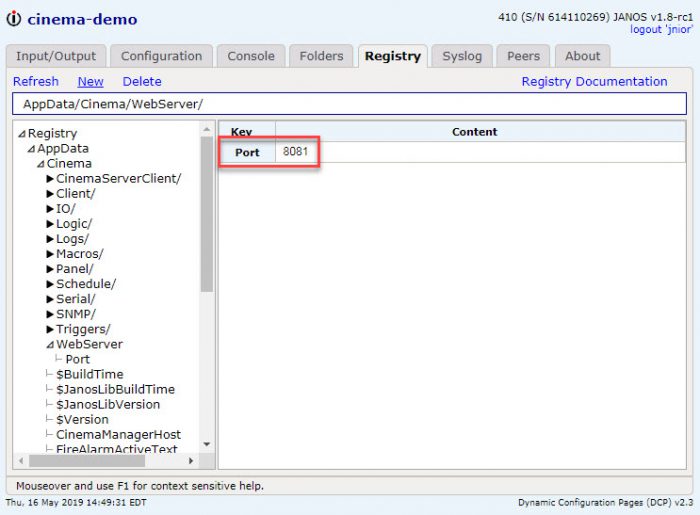
To enable this you will need to set the AppData/Cinema/WebServer/Port registry key. The JNIOR will need to be rebooted after this key has been changed. In this example I chose 8081. Port 80 or 443 is normally the default web server port. This web server port is an additional web server that cinema is hosting to handle these types of requests.