RS-485 vs. EKM Power Meter

Written by Bruce Cloutier on Sep 15, 2026 9:34 am @bscloutier

Summary: A practical look at using RS-485 to network multiple EKM power meters with a JNIOR. We follow the application from the two-wire connection through Java communications and protocol handling to retrieving real-time power and cumulative energy measurements.

An electronic power meter can be easily added to an electrical panel to measure the power being used by a home, a piece of equipment or an individual circuit. In addition to accumulating energy usage in kilowatt-hours, these meters can provide voltage, current, instantaneous power, power factor, frequency and other useful measurements.
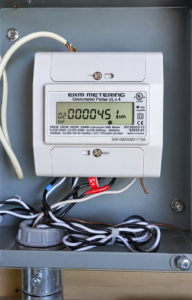
To measure power, the meter needs to know both voltage and current. Voltage is measured by connecting the meter to each electrical leg being monitored. Current is measured using a current transformer, or CT, that snaps around the conductor, often immediately after the circuit breaker. The load current does not need to pass through the meter itself. This makes adding a meter to an existing installation relatively straightforward.

This can be particularly useful in a solar installation. Solar inverters generally provide information about how much power they are generating. The electric utility’s meter, on the other hand, measures the net power flowing between the property and the grid. If the home is consuming 5 kW while the solar system is producing 3 kW, the utility meter sees only the remaining 2 kW being supplied by the grid. Neither measurement by itself tells you the whole story.

The utility meter may contain much of the information that you would like to have, but generally you cannot simply connect to it and retrieve those measurements programmatically. You can read its display and the utility can collect information from it remotely, but access to its electronic interface is typically reserved for the utility.

Adding your own power meter gives you a measurement that you control. Combined with the production data available from the solar inverters, a meter measuring the home makes it possible to calculate where the power is coming from and where it is going. More importantly, those measurements can be retrieved by software. They can be logged, graphed, displayed remotely, used to generate alarms or incorporated into other calculations and control decisions.
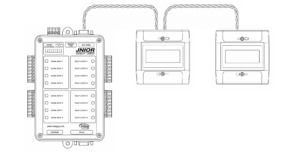
There are many applications where measurements at more than one point are useful. A facility might monitor its incoming service as well as individual distribution panels or major pieces of equipment. A generator might be monitored separately from the loads it supplies. Solar generation, battery storage and utility power can all represent separate points where knowing the direction and magnitude of power flow is useful.

Once multiple meters are installed, however, the measurements need to be collected from each of them individually. Running a separate communications connection to every meter would quickly become cumbersome. A better solution is to network the meters, allowing them to share a common connection while providing some means of addressing each meter individually.

Our own solar installation [JNIOR Monitors Solar] provides a good example. We used a power meter to independently monitor the power supplied by the Powerwall. A second meter monitors power consumed by the residence. Together with information obtained from the solar inverters, these measurements let us determine how power is moving through a fairly complex solar and battery installation.

EKM Metering produces relatively inexpensive power meters that fit this application well. Their Omnimeters can be read programmatically and multiple meters can share an RS-485 communications network. Each meter can be individually addressed, allowing one controller to retrieve measurements from multiple points in the electrical system.

Meter Network

EKM Meters in network arrangement

RS-485 Networking

RS-485 provides a simple way for multiple devices to communicate over a common pair of wires. Rather than requiring a separate serial connection for each meter, the devices share a communications network. Each meter listens to the same traffic and the protocol determines which one is being addressed. This makes RS-485 particularly useful when measurements need to be collected from several locations.

RS-485 evolved from earlier forms of serial communications. The familiar RS-232 interface generally provides a point-to-point connection using separate transmit and receive signals. RS-422 introduced differential signaling, improving noise immunity and allowing communication over greater distances. RS-485 extended the concept to support multiple devices sharing the same bus. This requires hardware specifically designed to drive and receive an RS-485 network, so an ordinary serial port cannot simply be wired to the two RS-485 conductors. A suitable serial or USB adapter is normally required. The JNIOR Model 410 includes a multi-protocol AUX serial port capable of RS-485 operation, which is what we use to communicate with the EKM meters.

The two-wire RS-485 network is straightforward. A pair of wires runs from the controller to each meter in sequence, with all of the devices connected to the same pair. The wiring should form a bus rather than branching into separate runs. Terminating resistors, typically 120 ohms, are recommended at the ends of the network to reduce signal reflections. With that, the physical network is essentially complete.

Programming the JNIOR

The JNIOR is a small industrial controller running the JANOS operating system. In addition to its built-in I/O and automation capabilities, applications can be written in Java and executed directly on the controller. This makes it possible to implement device-specific protocols such as the one used by the EKM meters without requiring additional hardware or software.

There is no specialized embedded development environment. JNIOR applications are ordinary Java programs developed using a standard Java IDE, compiled into JAR files and transferred to the controller for execution.

JANOS provides the Java runtime along with classes for accessing the JNIOR hardware and operating-system services. That includes direct access to the AUX serial port that we will use for the RS-485 network.

Network Etiquette

The code that follows is part of a Java application that runs continuously on the JNIOR, periodically polling the meters and processing the returned measurements. Before entering that control loop, the application opens and configures the AUX serial port for the RS-485 network.

From the software side, communicating with the meters starts by joining the RS-485 network. The EKM meters communicate at 9600 baud using 7 data bits, even parity and 1 stop bit (9600 7E1). On the JNIOR Model 410 we use the AUX serial port and place it into RS-485 mode.

AUXSerialPort aux = new AUXSerialPort();
aux.open();
aux.setSerialPortParams(AUXSerialPort.SPEED_9600, AUXSerialPort.DATABITS_7,
        AUXSerialPort.STOPBITS_1, AUXSerialPort.PARITY_EVEN);
aux.setRS485(true);
aux.setInputBufferSize(512);

out = new PrintStream(aux.getOutputStream());
in = new DataInputStream(aux.getInputStream());

There is a little more going on here than the Java code suggests. On a two-wire RS-485 network the transmitter must be enabled while sending and disabled when transmission is complete. Getting that timing right can be surprisingly tricky.

A typical UART is double buffered. Loading the last byte into the UART does not mean that the byte has finished traveling over the wire. Disabling the RS-485 transmitter too soon can therefore truncate that final character.

JANOS handles this at a lower level. Output is buffered and interrupts feed the UART while the application continues running. When the port is placed into RS-485 mode, JANOS also manages the transmitter enable and keeps it active until the UART has actually completed transmission. It then releases the bus for another device to respond.

As a result, none of that machinery appears in the application. From Java we can simply write to the output stream:

out.print(request);
out.flush();

The application does not need to know when to enable or disable the RS-485 transmitter. JANOS, in our case, takes care of the necessary bus etiquette.

Talking to the Meter

The RS-485 interface gets the bytes to and from the meters, but it does not define what those bytes mean. That is the job of the EKM communications protocol.

Each meter has a unique 12-digit serial number printed on its face. That serial number also serves as its address on the RS-485 network. Since every meter sees traffic on the common bus, the address identifies which meter is expected to respond.

For example, the meter shown here is serial number 000300011794. That same number appears directly in the request used by our application:

String request = "/?00030001179400!\r\n";

if (!send_request(request)) {
    JANOS.logfile(log, "[ekm_battery] echo error");
    return;
}

The request is quite simple. It begins with /?, followed by the 12-digit meter address. The 00 selects what EKM documentation calls Request A, and the request ends with ! followed by carriage return and line feed.

The response to Request A is considerably larger. The meter returns a fixed 255-byte block containing its type and firmware version, its address, accumulated energy measurements, voltage and current for each phase, instantaneous power, power factor, frequency, pulse counts, current direction, output states and the meter’s internal time. The block concludes with framing characters and a two-byte CRC.

Before we can make use of that response, however, we have to successfully send the request and wait for the meter to answer. Our application handles that in send_request().

The send_request() routine first discards anything that might have been left in the receive buffer from an earlier transaction. We want the next characters received to belong to the request we are about to make.

static boolean send_request(String request) throws Throwable {

    // flush any pending data
    while (in.available() > 0)
        in.read();

    // transmits request
    out.print(request);
    out.flush();

As discussed earlier, flush() does not mean that the application has to wait for every character to physically leave the UART. JANOS manages the buffered output, RS-485 transmitter control and eventual release of the bus.

There is another characteristic of this interface that the application needs to handle. The request that we transmit appears back in the receive stream as an echo. Before looking for the meter response, we wait for that complete echo to arrive.

    // verify echo and response
    // request that we send is first echoed
    long timeout = JANOS.uptimeMillis() + 500;

    while (in.available() < request.length()) {
        System.sleep(5);

        if (JANOS.uptimeMillis() > timeout)
            return false;
    }

We allow up to 500 milliseconds for the complete echo. There is no reason to spin continuously while waiting, so the thread sleeps for 5 milliseconds between checks.

Once enough characters have arrived, we retrieve exactly the number of bytes that were transmitted and compare them with the original request.

    byte[] echo = new byte[request.length()];
    in.read(echo);

    String str = new String(echo);
    if (!str.equals(request))
        return false;

    return true;
}

A timeout or incorrect echo causes send_request() to return false. Otherwise the request has been successfully transmitted and its echo removed from the input stream. What arrives next should be the meter’s response.

That response is handled separately by read_block().

Once the request echo has been removed, the next data received should be the meter’s response. EKM defines the response to Request A as a fixed 255-byte block, so read_block() knows exactly how much data to collect.

static byte[] read_block(String id) throws Throwable {

    byte[] data = new byte[255];
    int p = 0;

    long timeout = JANOS.uptimeMillis() + 1000;

    while (p < 255) {
        if (in.available() > 0) {
            data[p++] = (byte) in.read();
            continue;
        }

        System.sleep(5);

        if (JANOS.uptimeMillis() > timeout) {
            if (p == 0)
                JANOS.logfile(log, "[" + id + "] no response");
            else
                JANOS.logfile(log, "[" + id + "] data error");

            return null;
        }
    }

    return data;
}

The routine allocates space for the entire response and then collects characters as they become available. Again, there is no reason to consume processor time continuously while waiting. If nothing is immediately available, the thread sleeps for 5 milliseconds.

A one-second timeout bounds the entire operation. If nothing at all has been received when the timeout expires, we log no response. If only part of the 255-byte block has arrived, we instead report a data error. In either case null tells the caller that there is no valid block to process.

Otherwise, once all 255 bytes have been collected, the completed array is returned to the caller.

byte[] data = read_block("ekm_battery");
if (data == null)
    return;

At this point we have received an entire meter response, but we still don’t know whether it arrived intact. Before interpreting any of the measurements, the next step is to verify its CRC.

At this point we have addressed one specific meter on the shared RS-485 network and acquired its complete 255-byte response. The same sequence can then be repeated using the serial number of the next meter. In this way any number of meters can share the network while being polled individually. We now have the data. The next task is to make sense of it.

Making Sense of the Data

Fortunately, the EKM response is not particularly difficult to decode. Most of the measurements are returned as fixed-width ASCII fields at known locations within the 255-byte block. Once the integrity of the block has been verified, extracting a measurement is largely a matter of knowing its offset, length and scaling.

Before doing any of that, however, we need to check the CRC.

The final two bytes of the response contain a CRC that can be used to verify that the block was received correctly. We do this before attempting to extract any of the measurements.

static boolean verify_crc(byte[] data, String id) {

    int size = data.length - 2;
    int ck = ArrayUtils.getShort(data, size);

    int crc = JANOS.CRC16(data, 1, size - 1, 0xffff);
    crc = ArrayUtils.swapEndian((short) crc) & 0x7f7f;

    if (crc != ck) {
        JANOS.logfile(log, "[" + id + "] crc error");
        return false;
    }

    return true;
}

The two CRC bytes are removed from consideration first and combined to obtain the checksum supplied by the meter. We then calculate a CRC-16 over the received data beginning with byte 1. Byte 0 is the STX character and is not included in the calculation.

The CRC therefore covers the meter data and the framing characters near the end of the response, but not the initial STX or the two CRC bytes themselves.

There is one additional wrinkle. The meter is operating with 7-bit characters, so the transmitted CRC has its high bit cleared in each byte. After calculating the CRC, we swap the byte order and mask those bits with 0x7f7f before comparing it with the value supplied by the meter.

if (!verify_crc(data, "ekm_battery"))
    return;

Only after this check succeeds do we consider the 255-byte response trustworthy enough to parse.

Gathering the Important Data

With the CRC verified, we can finally extract the measurements that we came here for. In this application we are primarily interested in two things: the accumulated energy in kilowatt-hours and the instantaneous power in watts.

EKM provides a description of the information contained in the response, but not a particularly useful byte-by-byte data format specification. Some protocol archaeology was therefore required. By capturing an actual response and working through it field by field, we developed the following map. This is taken directly from the application source:

// Parsing
//  0   1   0x02             STX (start of text, not in CRC)
//  1   2   0x1024           Omnimeter Pulse v.4 Model
//  3   1   0x23             Firmware vers
//  4   12  "000300006998"   Address (Meter S/N)
//  16  8   "00954384"       Total kWh*100 (9543.84)
//  24  8   "00260741"       Reactive kVARh*100 (2607.41)
//  32  8   "00000000"       Total Reverse kWh*100 (0.0)
//  40  8   "00457804"       L1 kWh*100 (4578.04)
//  48  8   "00496447"       L2 kWh*100 (4964.47)
//  56  8   "00000000"       L3 kWh*100 (0.0)
//  64  8   "00000000"       L1 Reverse kWh*100 (0.0)
//  72  8   "00000000"       L2 Reverse kWh*100 (0.0)
//  80  8   "00000000"       L3 Reverse kWh*100 (0.0)
//  88  8   "00954384"       Resettable kWh*100 (9543.84)
//  96  8   "00000000"       Resettable Reverse kWh*100 (0.0)
// 104  4   "1274"           L1 Voltage x10 (127.4)
// 108  4   "1273"           L2 Voltage x10 (127.3)
// 112  4   "0000"           L3 Voltage x10 (0.0)
// 116  5   "00020"          L1 Amps x10 (2.0)
// 121  5   "00046"          L2 Amps x10 (4.6)
// 126  5   "00000"          L3 Amps x10 (0.0)
// 131  7   "0000244"        L1 Power/Watts (244)
// 138  7   "0000514"        L2 Power/Watts (514)
// 145  7   "0000000"        L3 Power/Watts (0)
// 152  7   "0000760"        Power Watts Total (760)

For our purposes, most of that can now be ignored. We came looking primarily for cumulative energy and instantaneous power, and their locations in the response are now known.

The meter returns most values as fixed-length ASCII decimal fields. For the residence meter, cumulative energy begins at byte 16 and occupies eight characters. The value is expressed in hundredths of a kilowatt-hour, so extracting it is straightforward:

double tkwh = Long.parseLong(new String(data, 16, 8)) / 100.0;
JANOS.setRegistryString("Metering/$ResidenceKWH",
        String.format("%.2f", tkwh));

For example, a field containing 00954384 represents 9,543.84 kWh. The instantaneous total power is even simpler. It begins at byte 152, occupies seven characters and is already expressed in watts:

long pwr = Long.parseLong(new String(data, 152, 7));
JANOS.setRegistryString("Metering/$ResidencePWR",
        String.format("%lld", pwr));

The Powerwall meter is slightly more interesting because power can flow in either direction. The meter separately accumulates reverse energy. We retrieve that value and subtract it from the total to obtain the net accumulated energy:

double trev = Long.parseLong(new String(data, 32, 8)) / 100.0;

double tkwh = Long.parseLong(new String(data, 16, 8)) / 100.0 - trev;
JANOS.setRegistryString("Metering/$BatteryKWH",
        String.format("%.2f", tkwh));

Instantaneous power also requires us to pay attention to direction. The meter supplies the magnitude of the power on each line along with a separate field indicating the direction of current flow. We decode that field and apply the appropriate sign to each measurement:

int dir = (data[228] - 1) & 0x07;

long L1_pwr = Long.parseLong(new String(data, 131, 7));
if ((dir & 0x04) != 0)
    L1_pwr *= -1;

long L2_pwr = Long.parseLong(new String(data, 138, 7));
if ((dir & 0x02) != 0)
    L2_pwr *= -1;

long pwr = L1_pwr + L2_pwr;
JANOS.setRegistryString("Metering/$BatteryPWR",
        String.format("%lld", pwr));

And there we have what we needed: cumulative energy and instantaneous power from each meter, with the Powerwall measurement retaining the direction of power flow. The remaining fields in the EKM response can be decoded in much the same way when they are useful.

Summary

RS-485 is hardly a new technology, but that is part of its appeal. A simple pair of wires can connect multiple devices over useful distances, and the interface is well suited to equipment that may remain in service for many years.

In this application two EKM power meters share one RS-485 connection to a JNIOR. Each meter is individually addressed using the serial number printed on its face. A short request retrieves a block containing far more information than we actually need. From that we extract the instantaneous power and accumulated energy needed to monitor the flow of power through our solar and battery installation.

There are details hidden beneath that simple description. The RS-485 transmitter must be managed correctly, requests and responses need to be coordinated, communications errors must be detected, and the returned data has to be understood. JANOS handles the low-level serial interface while a relatively small amount of Java takes care of the protocol.

The result is not particularly exotic. It is simply a reliable way to collect useful measurements from equipment that provides a serial interface. Sometimes that is all an edge controller needs to do.

On this page
Fetched Content